
Claude Cowork is the agent mode of Anthropic's Claude desktop app: it carries out complete tasks (sorting and renaming files, turning notes into documents, multi-source research, data analysis) inside the folders and tools you authorise. It has been available on all paid plans since April 2026, with admin controls for teams.
Claude Cowork, in plain words.
Claude Cowork is the agent mode of Anthropic's Claude desktop app: it carries out complete tasks (files, documents, research, analysis) inside the folders and tools the user authorises. Instead of giving you an answer to copy and paste, Claude chains the steps itself: it opens the files, cross-checks the information, produces the final document and saves it in the right place.
Launched as a research preview in January 2026, Cowork has been available on all paid plans since April 9, 2026, on macOS and Windows. Anthropic's documentation also mentions web and mobile versions in beta, and a side panel in Chrome.
What it does for a small business.
- Sort and rename a folder of invoices or site photos according to your naming rules.
- Turn notes into a document: meeting minutes, a sales proposal from a template, a summary of several PDFs.
- Run multi-source research: competitor monitoring, supplier comparison, with a summary table.
- Analyse data: a sales export or a tracking spreadsheet, with charts and commentary.
- Apply your procedures through skills: folders of instructions and resources that Claude loads only when the task calls for them.
Sessions can run locally, in an isolated environment on the computer, or in the cloud (beta), which lets scheduled tasks continue while the laptop is closed.
Controls for teams.
On Team and Enterprise plans, Anthropic's documentation describes several useful safeguards:
| Setting | Default | What it allows |
|---|---|---|
| Cowork enabled | On | Account owners can turn it off for the organisation |
| "Always allow" for connectors | Off | Tools that can write into your apps must be approved task by task |
| Cloud execution (Enterprise) | Off | Granted to specific groups only, through custom roles |
| Session monitoring | - | Sessions visible in the compliance API, events exportable via OpenTelemetry to your security tools |
Connector permissions are set organisation-wide by owners (always allow, needs approval, blocked), and Claude inherits each user's permissions in the connected service: it cannot reach anything the user could not open. Note that local sessions are stored on users' computers and cannot be deleted centrally, worth covering in your AI policy.
The risks to know about.
Anthropic says it plainly: the risk of prompt injection "is not zero". A booby-trapped document or web page can contain hidden instructions that the agent might follow. The official recommendations are common sense: do not give access to sensitive files, watch for unusual actions, and limit web browsing to trusted sources. In practice, keep write actions behind approval until the team has built confidence.
Cowork, chat or a custom agent?
| Claude chat | Claude Cowork | Custom agent | |
|---|---|---|---|
| Who starts the task | The employee, message by message | The employee, one complete task | An event (email, form, schedule) |
| Where it acts | In the conversation | On the computer and authorised connectors | In your systems, through their APIs |
| Best for | Writing, analysing, thinking | One-off multi-step tasks | Recurring, high-volume tasks |
What I recommend.
Cowork is a real gain for multi-step office tasks, but it deserves a controlled start. Concretely: begin with two or three volunteers, on a dedicated folder rather than the whole drive, with read-only connectors at first, and keep "Always allow" switched off. Then write two or three skills that capture your procedures (minutes format, file naming, proposal template).
I set up and train teams on Claude every week, and Cowork is part of my workshops. I am not an official Anthropic partner: my view is that of a daily user and integrator.
Claude Skills in production
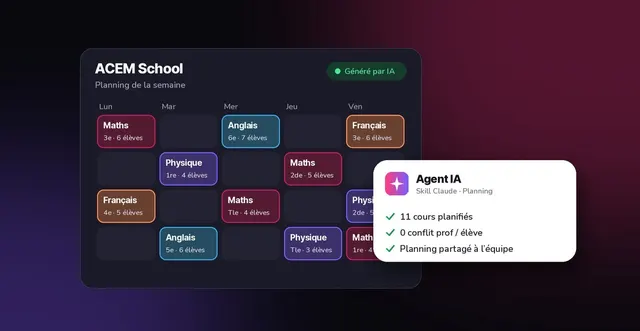
- ACEM SchoolAI agent · Claude SkillsTutoring association near Lyon: an AI agent that helps managers build student / teacher schedules, and the team's first steps with AI.Private project
- XEFIAI architect · backendLyon IT services company (2025-2026): business apps for car dealerships and internal AI agents built into the teams' workflows.

Related questions.
Does Cowork replace a custom AI agent?
No, they complement each other. Cowork is started by an employee, on their computer, for a one-off task. A custom agent runs on its own inside your systems (on every new email, every evening, on every quote request) following rules set once and for all.
Do I need a Team plan to use Cowork?
No, Cowork is available on all paid plans (Pro, Max, Team, Enterprise). Team and Enterprise add the admin controls a business needs: turning it off, setting approvals, monitoring sessions.
Sources
- Anthropic Help Center : Using Claude Cowork on Team and Enterprise plans (French version)consulted October 13, 2026
- Claude Help Center : Use connectors to extend Claude's capabilitiesconsulted October 13, 2026
- Blog du Modérateur : Claude Cowork available to all (April 10, 2026, in French)consulted October 13, 2026
- Anthropic : Introducing Agent Skills (October 16, 2025)consulted October 13, 2026
- Anthropic : Claude pricing (paid plans)consulted October 13, 2026
Information last checked on October 13, 2026. Claude Cowork evolves quickly: the features and settings described here are those documented on that date.